
Step 1: Factory reset the scanner (only if it was used before). If the scanner was previously set up for another app or device, scan Set Factory Defaults below. If it’s brand new, skip this step.

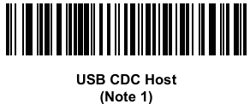
Step 2. Scan “USB CDC Host”. This puts the scanner in the right paring mode for Windows. This barcode works for Windows 10+ so Windows 11 devices also use it.
Step 3. Plug the scanner (or its cradle) into the device's USB port.
Step 4. Open InspectNTrack and start scanning. The scanner is detected automatically — there’s no pairing step for USB.