
When working within Routes, a user is always required to scan a location first before scanning a movable equipment. Each time this sequence of scans is performed, the system validates that the movable equipment is assigned to the previously scanned location. When the equipment IS assigned to the scanned location, the equipment details screen opens with no messaging. When the equipment IS NOT assigned to the scanned location, the move process is triggered. The following instructions specify moving a fire extinguisher, but the process works for an movable equipment type.
Note: The extinguisher's current location and the location the extinguisher is moving to must be included in the user’s downloaded route for all scans to be recognized. The in-service and spare extinguisher must also be downloaded.
Steps to Move a Fire Extinguisher
-
Physically swap the extinguishers
-
Take a spare extinguisher to the location.
-
Remove the bad extinguisher and place the spare extinguisher in the location.
-
-
Assign the spare extinguisher to the location
-
Scan the location barcode of the location where you placed the spare.
-
Scan the spare extinguisher's equipment barcode.
-
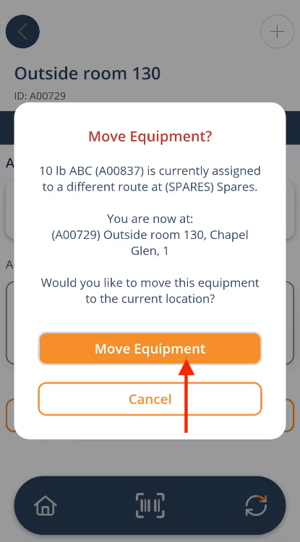
The move pop-up will display. Review the information and press Move Equipment.
-
-
Move the bad extinguisher to service
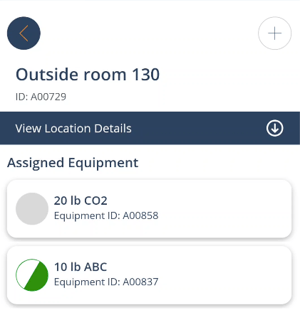
- The original location now has two extinguisher's assigned to it. Take the bad extinguisher to the extinguisher out of service location (or location of choice).
-
Scan the out of service location barcode.
-
Scan the bad extinguisher barcode.
-
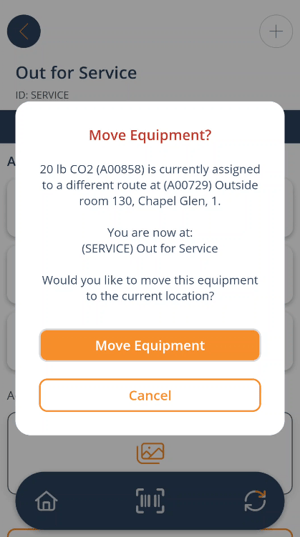
The move pop-up will display. Review the information and press Move Equipment.
- The original location now has two extinguisher's assigned to it. Take the bad extinguisher to the extinguisher out of service location (or location of choice).
Completion
-
The swap is complete in the mobile app.
-
Sync the app to reflect the changes in the web portal, History Report and Tour Report.
