.png?width=250&height=63&name=InspectTrack-Logo%20(1).png)
Important Tip: Always select Today unless you are specifically trying to access inspections that are not due. This prevents confusion and unexpected behavior from the app.
The feature Sync Due as of allows the user to push the users assignment sync as of date to a longer duration. By default when you create a users assignment and you select Due and Overdue, the assignment will send anything that is due or overdue as of today.
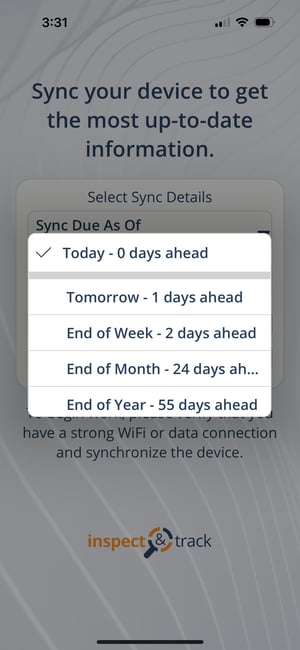
The Sync due as of in the device menu will override that date to later durations like end of week, end of month, and so on. This allows you to make sure that you have all of the inspections due as of the end of the period selected on the device.
For example, let’s say it is the 5th of the month, you have your users assignment set to Due and Overdue, but you want all inspections due to the end of the month send to your device. By setting the Sync due as of selector to the end of the month, this will force the sync to follow the rules set by the device and ignore the as of today rule.
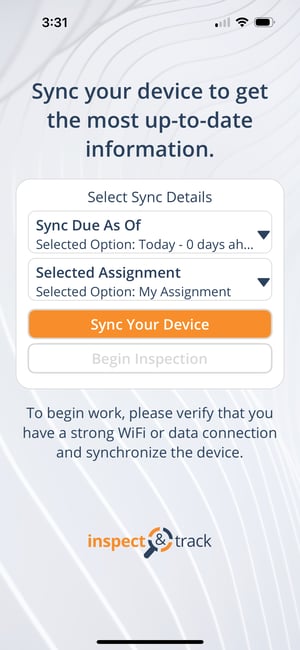
When you login to the mobile app you land on the sync screen. On the sync screen, tap on Sync Due As Of - the first option in the Select Sync Details Box. A selection menu will open. Select the future date from the options and sync.
If you are already logged into the app you can still access this selection. From any screen swipe right to open the side menu, or use the bottom toolbar to navigate to Home and press the menu icon.

Press Switch Assignment on the side menu.
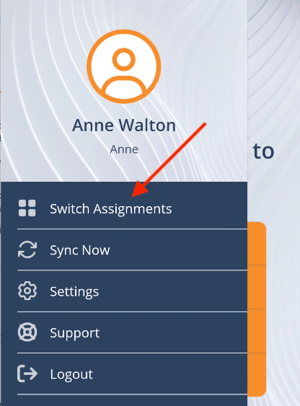
This returns you to the original assignment selection screen. Select the desired assignment and press Sync Your Device to download it.