.png?width=250&height=63&name=InspectTrack-Logo%20(1).png)
Up Next is a feature that offers zone navigation guidance. When enabled, a pop-up message with information about the next checkpoint on the list is displayed each time all tasks for a checkpoint are completed.
How to Enable Up Next
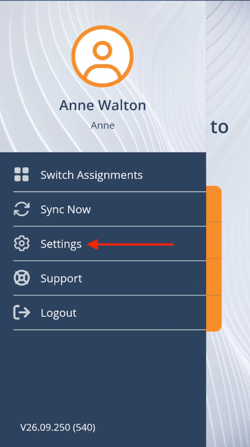
From any screen of the mobile app (other than within an active inspection), swipe right to open the side menu, or use the bottom toolbar to navigate to Home and press the menu icon. Press Settings.
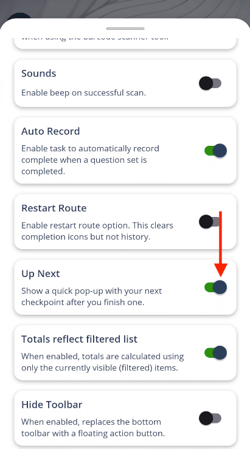
On the Settings screen, toggle Up Next to the on position.
How to Use Up Next
Perform inspections from a Zone list. Once a checkpoint has all tasks completed, the Up Next box is displayed with information about the next checkpoint and zone progress percentage.
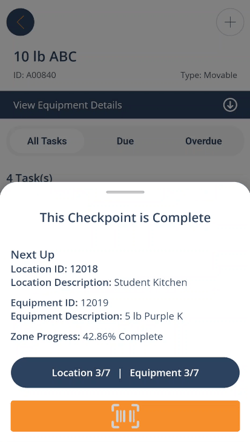
From this screen, perform one of the following actions:
- Swipe down to close the box.
- Scan a new checkpoint with a laser scanner.
- Press the orange scan button to scan the next checkpoint.